mirror of
https://github.com/dqzboy/Docker-Proxy.git
synced 2026-01-12 16:25:42 +08:00

285 lines
12 KiB
Markdown
285 lines
12 KiB
Markdown
<p align="right">
|
||
<strong>中文</strong> | <a href="./README.en.md">English</a>
|
||
</p>
|
||
|
||
<div style="text-align: center">
|
||
<p align="center">
|
||
<img src="https://github.com/dqzboy/Docker-Proxy/assets/42825450/c187d66f-152e-4172-8268-e54bd77d48bb" width="230px" height="200px">
|
||
<br>
|
||
<i>自建Docker镜像加速服务,基于官方 registry 一键部署Docker、K8s、Quay、Ghcr、Mcr、elastic、nvcr等镜像加速\管理服务.</i>
|
||
</p>
|
||
</div>
|
||
|
||
<div align="center">
|
||
|
||
[](https://github.com/dqzboy)
|
||
[](https://github.com/dqzboy/Docker-Proxy/graphs/contributors)
|
||
[](https://github.com/dqzboy/Docker-Proxy/issues)
|
||
[](https://github.com/dqzboy/Docker-Proxy)
|
||
[](https://github.com/dqzboy/Docker-Proxy)
|
||
[](https://github.com/dqzboy/Docker-Proxy/blob/main/LICENSE)
|
||
|
||
|
||
📢 <a href="https://t.me/+ghs_XDp1vwxkMGU9" style="font-size: 15px;">Docker Proxy-TG交流群</a>
|
||
|
||
</div>
|
||
|
||
---
|
||
|
||
## 📝 准备工作
|
||
⚠️ **重要**:选择一台国外服务器,并且未被墙。对于域名,无需进行国内备案。你也可以通过一些平台申请免费域名。在一键部署过程中,如果选择安装Caddy,它将自动配置HTTPS。若选择部署Nginx服务,则需要自行申请一个免费的SSL证书,或者通过其他方式来实现SSL加密。
|
||
|
||
<details>
|
||
<summary><strong>免费域名证书申请</strong></summary>
|
||
<div>
|
||
|
||
**方式一:** [Acme.sh自动生成和续订Lets Encrypt免费SSL证书](https://www.dqzboy.com/16437.html)
|
||
|
||
**方式二:** 域名托管到[Cloudflare 开启免费SSL证书](https://www.cloudflare.com/zh-cn/application-services/products/ssl/)
|
||
|
||
**方式三:** 可通过第三方平台,申请免费的域名证书(免费一般都为DV证书),适用于个人网站、博客和小型项目
|
||
|
||
</details>
|
||
|
||
|
||
<details>
|
||
<summary><strong>如果你没有上面提到的环境,那么你也可以尝试以下的几种方案</strong></summary>
|
||
<div>
|
||
|
||
**方案一:** 🚀 如果你身边没有上面提到的这些东西,那么你也可以试试使用第三方免费容器部署服务 **[ClawCloud](cloud/ClawCloud/README.md)、[Render](cloud/Render/README.md)**
|
||
|
||
**方案二:** 如果你只有一台服务器,不想搞域名也不想配置TLS,那么你可以修改Docker的配置文件`daemon.json`,指定`insecure-registries` 为你的镜像加速地址
|
||
|
||
**方案三:** 如果你是在国内的服务器部署,那么你可以在执行一键部署时配置代理,同时会帮你解决国内无法安装Docker的问题
|
||
|
||
**方案四:** 试试这个项目,基于[Cloudflare Workers](https://github.com/dqzboy/Workers-Proxy-Docker)搭建Docker镜像代理服务
|
||
|
||
</details>
|
||
|
||
---
|
||
|
||
> **部署过程中出现的问题或者疑问,请点击这里 [问题总结](Issue/issue.md),查看是否有你遇到的情况!尝试先自己解决。**
|
||
|
||
<table style="width: 100%; table-layout: fixed;">
|
||
<tr>
|
||
<td width="50%" align="center"><b>海外服务器</b></td>
|
||
<td width="50%" align="center"><b>海外服务器</b></td>
|
||
</tr>
|
||
<tr>
|
||
<td width="50%" align="center">
|
||
<a href="https://dqzboy.github.io/proxyui/racknerd" target="_blank">
|
||
<img src="https://cdn.jsdelivr.net/gh/dqzboy/Images/dqzboy-proxy/1.png?raw=true"
|
||
alt="RackNerd"
|
||
style="width: 100%; height: auto; max-width: 400px; object-fit: contain;">
|
||
</a>
|
||
</td>
|
||
<td width="50%" align="center">
|
||
<a href="https://app.cloudcone.com/?ref=12690" target="_blank">
|
||
<img src="https://cdn.jsdelivr.net/gh/dqzboy/Images/dqzboy-proxy/2.png?raw=true"
|
||
alt="CloudCone"
|
||
style="width: 100%; height: auto; max-width: 400px; object-fit: contain;">
|
||
</a>
|
||
</td>
|
||
</tr>
|
||
</table>
|
||
|
||
---
|
||
|
||
## 🔨 功能
|
||
- [x] 一键部署Docker镜像代理服务的功能,支持基于官方Docker Registry的镜像代理.
|
||
- [x] 支持多个镜像仓库的代理,包括Docker Hub、GitHub Container Registry(ghcr.io)、Quay Container Registry(quay.io)、Kubernetes Container Registry(k8s.gcr.io)、Microsoft Container(mcr.microsoft.com)、Elastic Stack(docker.elastic.co)
|
||
- [x] 自动检查并安装所需的依赖软件,如Docker\Compose、Nginx\Caddy等,并确保系统环境满足运行要求
|
||
- [x] 根据你所选择部署的WEB反代服务,自动渲染对应的Nginx或Caddy服务配置
|
||
- [x] 支持配置账号密码登入Docker Hub,可访问 Docker Hub 上的私有镜像同时解决Docker Hub的下载频率限制 [配置参考](https://github.com/dqzboy/Docker-Proxy/blob/main/Issue/issue.md#12%E5%85%B3%E4%BA%8Edocker-hub%E5%85%8D%E8%B4%B9%E6%8B%89%E5%8F%96%E6%94%BF%E7%AD%96%E5%86%8D%E6%AC%A1%E5%8F%98%E6%9B%B4%E5%90%8E%E7%9A%84%E8%A7%A3%E5%86%B3%E6%96%B9%E6%A1%88)
|
||
- [x] 支持自定义配置代理缓存时间(PROXY_TTL)、支持配置IP黑白名单,防止恶意攻击行为
|
||
- [x] 提供了服务管理、配置管理、服务卸载、认证授权等功能,方便用户进行日常管理和维护
|
||
- [x] 支持一键配置本机Docker代理和容器服务代理(HTTP_PROXY),仅支持http
|
||
- [x] 支持国内服务器一键部署,解决国内环境无法安装Docker\Compose服务难题
|
||
- [x] 支持主流Linux发行版操作系统,例如Centos、Ubuntu、Rocky、Debian、Rhel等,支持主流ARCH架构下部署,包括linux/amd64、linux/arm64
|
||
- [x] HubCMD-UI服务,面板展示、镜像搜索、文档教程、容器管理、容器监控、网络测试、用户中心等功能
|
||
|
||
## 📦 部署
|
||
### 通过项目脚本部署
|
||
```shell
|
||
# CentOS && RHEL && Rocky
|
||
yum -y install curl
|
||
# ubuntu && debian
|
||
apt -y install curl
|
||
|
||
# 国外环境
|
||
bash -c "$(curl -fsSL https://raw.githubusercontent.com/dqzboy/Docker-Proxy/main/install/DockerProxy_Install.sh)"
|
||
|
||
# 国内环境cdn加速地址
|
||
bash -c "$(curl -fsSL https://cdn.jsdelivr.net/gh/dqzboy/Docker-Proxy/install/DockerProxy_Install.sh)"
|
||
|
||
# 国内Github代理地址
|
||
bash -c "$(curl -fsSL https://ghp.ci/https://raw.githubusercontent.com/dqzboy/Docker-Proxy/main/install/DockerProxy_Install.sh)"
|
||
```
|
||
|
||
- **Hubcmd-UI** 面板,通过脚本安装。Demo [查看](https://dqzboy.github.io/proxyui/) 模拟环境,请实际部署后体验完整功能!
|
||
|
||
```
|
||
执行上面脚本,选项为:2 ---> 8 ---> 1
|
||
```
|
||
|
||
### 部署到第三方免费平台
|
||
<details>
|
||
<summary><strong>部署到 Claw Cloud</strong></summary>
|
||
<div>
|
||
|
||
> Claw Cloud 提供免费额度, 首月送5$,不需要验证信用卡,GitHub账号超过180天的用户注册,可解锁每月5$
|
||
|
||
使用Claw Cloud快速部署: [点击查看教程](cloud/ClawCloud/README.md)
|
||
|
||
</details>
|
||
|
||
<details>
|
||
<summary><strong>部署到 Render</strong></summary>
|
||
<div>
|
||
|
||
> Render 提供免费额度,绑卡后可以进一步提升额度
|
||
|
||
使用Render快速部署: [点击查看教程](cloud/Render/README.md)
|
||
|
||
</details>
|
||
|
||
<details>
|
||
<summary><strong>部署到 Koyeb</strong></summary>
|
||
<div>
|
||
|
||
> Koyeb 分配的域名在国内地区访问不是很稳定,不是很推荐!
|
||
|
||
使用Koyeb快速部署: [点击查看教程](cloud/Koyeb/README.md)
|
||
|
||
</details>
|
||
|
||
|
||
### Docker Compose 部署
|
||
<details>
|
||
<summary><strong>点击查看</strong></summary>
|
||
<div>
|
||
|
||
**⚠️ 注意:** 你需要对哪个镜像仓库进行加速,就下载哪个配置。`docker-compose.yaml`文件默认是部署所有的国外镜像仓库的加速服务,同样也是你部署哪个就配置哪个,其余的删除掉即可!
|
||
|
||
**1.** 下载[config](https://github.com/dqzboy/Docker-Proxy/tree/main/config)目录下对应的`yml`文件到你本地机器上
|
||
|
||
**2.** 下载[docker-compose.yaml](https://github.com/dqzboy/Docker-Proxy/blob/main/docker-compose.yaml)文件到你本地机器上,并且与配置文件同级目录下
|
||
|
||
**3.** 执行 `docker compose` 或 `docker-compose` 命令启动容器服务
|
||
```shell
|
||
# 启动全部容器
|
||
docker compose up -d
|
||
|
||
# 启动指定的容器,例如: Docker Hub Registry Proxy
|
||
docker compose up -d dockerhub
|
||
|
||
# 查看容器日志
|
||
docker logs -f [容器ID或名称]
|
||
```
|
||
|
||
**4.** 如果你对Nginx或Caddy不熟悉,那么你可以使用你熟悉的服务进行代理。也可以直接通过IP+端口的方式访问
|
||
|
||
</details>
|
||
|
||
|
||
### 前缀替换说明
|
||
<details>
|
||
<summary><strong>点击查看</strong></summary>
|
||
<div>
|
||
|
||
| 源站 | 替换为 | 平台 |
|
||
|-------|---------------|----------|
|
||
| docker.io | hub.your_domain_name | docker hub
|
||
| gcr.io | gcr.your_domain_name | Google Container Registry
|
||
| ghcr.io | ghcr.your_domain_name | GitHub Container Registry
|
||
| k8s.gcr.io | k8s-gcr.your_domain_name | Kubernetes Container Registry
|
||
| registry.k8s.io | k8s.your_domain_name | Kubernetes's container image registry
|
||
| quay.io | quay.your_domain_name | Quay Container Registry
|
||
| mcr.microsoft.com | mcr.your_domain_name | Microsoft Container Registry
|
||
| docker.elastic.co | elastic.your_domain_name | Elastic Stack
|
||
| nvcr.io | nvcr.your_domain_name | NVIDIA Container Registry
|
||
|
||
</details>
|
||
|
||
---
|
||
|
||
|
||
## 💻 Hubcmd-UI
|
||
|
||
> HubCMD-UI 手动安装教程:[点击查看教程](hubcmdui/README.md)
|
||
|
||
<br/>
|
||
<table>
|
||
<tr>
|
||
<td width="50%" align="center"><b>镜像加速</b></td>
|
||
<td width="50%" align="center"><b>镜像搜索</b></td>
|
||
</tr>
|
||
<tr>
|
||
<td width="50%" align="center"><img src="https://cdn.jsdelivr.net/gh/dqzboy/Images/dqzboy-proxy/hubcmd-ui_01.png?raw=true"></td>
|
||
<td width="50%" align="center"><img src="https://cdn.jsdelivr.net/gh/dqzboy/Images/dqzboy-proxy/hubcmd-ui_02.png?raw=true"></td>
|
||
</tr>
|
||
<tr>
|
||
<td width="50%" align="center"><b>文档管理</b></td>
|
||
<td width="50%" align="center"><b>TAG搜索</b></td>
|
||
</tr>
|
||
<tr>
|
||
<td width="50%" align="center"><img src="https://cdn.jsdelivr.net/gh/dqzboy/Images/dqzboy-proxy/hubcmd-ui_03.png?raw=true"></td>
|
||
<td width="50%" align="center"><img src="https://cdn.jsdelivr.net/gh/dqzboy/Images/dqzboy-proxy/hubcmd-ui_11.png?raw=true"></td>
|
||
</tr>
|
||
<tr>
|
||
<td width="50%" align="center"><b>控制面板</b></td>
|
||
<td width="50%" align="center"><b>容器管理</b></td>
|
||
</tr>
|
||
<tr>
|
||
<td width="50%" align="center"><img src="https://cdn.jsdelivr.net/gh/dqzboy/Images/dqzboy-proxy/hubcmd-ui_07.png?raw=true"></td>
|
||
<td width="50%" align="center"><img src="https://cdn.jsdelivr.net/gh/dqzboy/Images/dqzboy-proxy/hubcmd-ui_09.png?raw=true"></td>
|
||
</tr>
|
||
</table>
|
||
|
||
---
|
||
|
||
|
||
## 🫶 赞助
|
||
如果你觉得这个项目对你有帮助,请给我点个Star。并且情况允许的话,可以给我一点点支持,总之非常感谢支持😊
|
||
|
||
<table>
|
||
<tr>
|
||
<td width="50%" align="center"><b> Alipay </b></td>
|
||
<td width="50%" align="center"><b> WeChat Pay </b></td>
|
||
</tr>
|
||
<tr>
|
||
<td width="50%" align="center"><img src="https://github.com/dqzboy/Deploy_K8sCluster/assets/42825450/223fd099-9433-468b-b490-f9807bdd2035?raw=true"></td>
|
||
<td width="50%" align="center"><img src="https://github.com/dqzboy/Deploy_K8sCluster/assets/42825450/9404460f-ea1b-446c-a0ae-6da96eb459e3?raw=true"></td>
|
||
</tr>
|
||
</table>
|
||
|
||
---
|
||
|
||
## 😺 其他
|
||
|
||
开源不易,若你参考此项目或基于此项目修改可否麻烦在你的项目文档中标识此项目?谢谢你!
|
||
|
||
|
||
## ❤ 鸣谢
|
||
感谢以下项目的开源的付出:
|
||
|
||
[CNCF Distribution](https://distribution.github.io/distribution/)
|
||
|
||
[docker-registry-browser](https://github.com/klausmeyer/docker-registry-browser)
|
||
|
||
## 🤝 参与贡献
|
||
|
||
感谢所有做过贡献的人!
|
||
|
||
<a href="https://github.com/dqzboy/Docker-Proxy/graphs/contributors">
|
||
<img src="https://contrib.rocks/image?repo=dqzboy/Docker-Proxy" />
|
||
</a>
|
||
|
||
|
||
## License
|
||
Docker-Proxy is available under the [Apache 2 license](./LICENSE)
|
||
|
||
---
|
||
|
||
[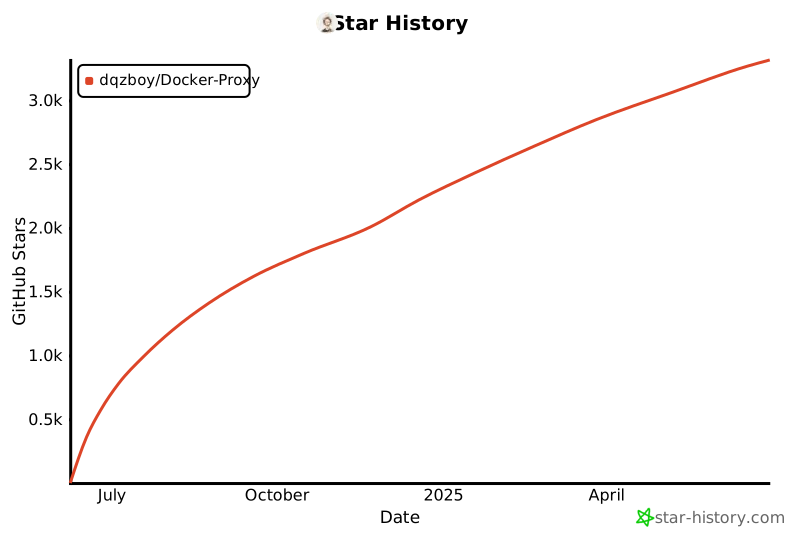](https://star-history.com/#dqzboy/Docker-Proxy&Date)
|