mirror of
https://github.com/dqzboy/Docker-Proxy.git
synced 2026-01-13 00:27:23 +08:00

286 lines
12 KiB
Markdown
286 lines
12 KiB
Markdown
<p align="right">
|
||
<strong>中文</strong> | <a href="./README.en.md">English</a>
|
||
</p>
|
||
|
||
<div style="text-align: center">
|
||
<p align="center">
|
||
<img src="https://github.com/dqzboy/Docker-Proxy/assets/42825450/c187d66f-152e-4172-8268-e54bd77d48bb" width="230px" height="200px">
|
||
<br>
|
||
<i>自建Docker镜像加速服务,基于官方 registry 一键部署Docker、K8s、Quay、Ghcr、Mcr、elastic、nvcr等镜像加速\管理服务.</i>
|
||
</p>
|
||
</div>
|
||
|
||
<div align="center">
|
||
|
||
[](https://github.com/dqzboy)
|
||
[](https://github.com/dqzboy/Docker-Proxy/graphs/contributors)
|
||
[](https://github.com/dqzboy/Docker-Proxy/issues)
|
||
[](https://github.com/dqzboy/Docker-Proxy)
|
||
[](https://github.com/dqzboy/Docker-Proxy)
|
||
[](https://github.com/dqzboy/Docker-Proxy/blob/main/LICENSE)
|
||
|
||
|
||
📢 <a href="https://t.me/+ghs_XDp1vwxkMGU9" style="font-size: 15px;">Docker Proxy-TG交流群</a>
|
||
|
||
</div>
|
||
|
||
---
|
||
|
||
## 📝 准备工作
|
||
⚠️ **重要**:选择一台国外服务器,并且未被墙。对于域名,无需进行国内备案。你也可以通过一些平台申请免费域名。在一键部署过程中,如果选择安装Caddy,它将自动配置HTTPS。若选择部署Nginx服务,则需要自行申请一个免费的SSL证书,或者通过其他方式来实现SSL加密。
|
||
|
||
<details>
|
||
<summary><strong>免费域名证书申请</strong></summary>
|
||
<div>
|
||
|
||
**方式一:** [Acme.sh自动生成和续订Lets Encrypt免费SSL证书](https://www.dqzboy.com/16437.html)
|
||
|
||
**方式二:** 域名托管到[Cloudflare 开启免费SSL证书](https://www.cloudflare.com/zh-cn/application-services/products/ssl/)
|
||
|
||
**方式三:** 可通过第三方平台,申请免费的域名证书(免费一般都为DV证书),适用于个人网站、博客和小型项目
|
||
|
||
</details>
|
||
|
||
|
||
<details>
|
||
<summary><strong>如果你没有上面提到的环境,那么你也可以尝试以下的几种方案</strong></summary>
|
||
<div>
|
||
|
||
**方案一:** 🚀 如果你身边没有上面提到的这些东西,那么你也可以试试使用第三方免费容器部署服务 **[ClawCloud](cloud/ClawCloud/README.md)、[Render](cloud/Render/README.md)**
|
||
|
||
**方案二:** 如果你只有一台服务器,不想搞域名也不想配置TLS,那么你可以修改Docker的配置文件`daemon.json`,指定`insecure-registries` 为你的镜像加速地址
|
||
|
||
**方案三:** 如果你是在国内的服务器部署,那么你可以在执行一键部署时配置代理,同时会帮你解决国内无法安装Docker的问题
|
||
|
||
**方案四:** 试试这个项目,基于[Cloudflare Workers](https://github.com/dqzboy/Workers-Proxy-Docker)搭建Docker镜像代理服务
|
||
|
||
</details>
|
||
|
||
---
|
||
|
||
> **部署过程中出现的问题或者疑问,请点击这里 [问题总结](Issue/issue.md),查看是否有你遇到的情况!尝试先自己解决。**
|
||
|
||
|
||
---
|
||
|
||
## 🔨 功能
|
||
- [x] 一键部署Docker镜像代理服务,支持多个上游镜像仓库代理,如`Docker Hub`、`ghcr`、`quay`、`k8s`、`mcr.microsoft.com`、`docker.elastic.co`等
|
||
- [x] 自动检查安装软件依赖,如Docker\Compose、Nginx\Caddy等
|
||
- [x] 支持选择自动部署等反代服务,自动渲染对应Nginx或Caddy反代配置
|
||
- [x] 支持配置账号密码登入Docker Hub,可下载私有镜像并解决Docker Hub镜像下载频率限制 [配置参考](https://github.com/dqzboy/Docker-Proxy/blob/main/Issue/issue.md#12%E5%85%B3%E4%BA%8Edocker-hub%E5%85%8D%E8%B4%B9%E6%8B%89%E5%8F%96%E6%94%BF%E7%AD%96%E5%86%8D%E6%AC%A1%E5%8F%98%E6%9B%B4%E5%90%8E%E7%9A%84%E8%A7%A3%E5%86%B3%E6%96%B9%E6%A1%88)
|
||
- [x] 支持自定义配置代理缓存时间(PROXY_TTL)、支持配置IP黑/白名单,防止恶意攻击行为
|
||
- [x] 提供服务管理、配置管理、服务卸载、认证授权等功能,方便后期日常运维管理
|
||
- [x] 支持一键配置本机Docker代理和容器服务代理(HTTP_PROXY),仅支持http
|
||
- [x] 支持国内服务器一键部署,解决国内环境无法安装Docker\Compose服务难题
|
||
- [x] HubCMD-UI服务,面板展示、镜像搜索、文档教程、容器管理、容器监控告警等功能
|
||
|
||
## 📦 部署
|
||
### 通过项目脚本部署
|
||
```shell
|
||
# CentOS && RHEL && Rocky
|
||
yum -y install curl
|
||
# ubuntu && debian
|
||
apt -y install curl
|
||
|
||
# 国外环境
|
||
bash -c "$(curl -fsSL https://raw.githubusercontent.com/dqzboy/Docker-Proxy/main/install/DockerProxy_Install.sh)"
|
||
|
||
# 国内环境cdn加速地址
|
||
bash -c "$(curl -fsSL https://cdn.jsdelivr.net/gh/dqzboy/Docker-Proxy/install/DockerProxy_Install.sh)"
|
||
|
||
# 国内Github代理地址
|
||
bash -c "$(curl -fsSL https://ghp.ci/https://raw.githubusercontent.com/dqzboy/Docker-Proxy/main/install/DockerProxy_Install.sh)"
|
||
```
|
||
|
||
- **Hubcmd-UI** 面板,通过脚本安装。Demo [查看](https://dqzboy.github.io/proxyui/) 模拟环境,请实际部署后体验完整功能!
|
||
|
||
```
|
||
执行上面脚本,选项为:2 ---> 8 ---> 1
|
||
```
|
||
|
||
### 部署到第三方免费平台
|
||
<details>
|
||
<summary><strong>部署到 Claw Cloud</strong></summary>
|
||
<div>
|
||
|
||
> Claw Cloud 提供免费额度, 首月送5$,不需要验证信用卡,GitHub账号超过180天的用户注册,可解锁每月5$
|
||
|
||
使用Claw Cloud快速部署: [点击查看教程](cloud/ClawCloud/README.md)
|
||
|
||
</details>
|
||
|
||
<details>
|
||
<summary><strong>部署到 Render</strong></summary>
|
||
<div>
|
||
|
||
> Render 提供免费额度,绑卡后可以进一步提升额度
|
||
|
||
使用Render快速部署: [点击查看教程](cloud/Render/README.md)
|
||
|
||
</details>
|
||
|
||
<details>
|
||
<summary><strong>部署到 Koyeb</strong></summary>
|
||
<div>
|
||
|
||
> Koyeb 分配的域名在国内地区访问不是很稳定,不是很推荐!
|
||
|
||
使用Koyeb快速部署: [点击查看教程](cloud/Koyeb/README.md)
|
||
|
||
</details>
|
||
|
||
|
||
### Docker Compose 部署
|
||
<details>
|
||
<summary><strong>点击查看</strong></summary>
|
||
<div>
|
||
|
||
**⚠️ 注意:** 你需要对哪个镜像仓库进行加速,就下载哪个配置。`docker-compose.yaml`文件默认是部署所有的国外镜像仓库的加速服务,同样也是你部署哪个就配置哪个,其余的删除掉即可!
|
||
|
||
**1.** 下载[config](https://github.com/dqzboy/Docker-Proxy/tree/main/config)目录下对应的`yml`文件到你本地机器上
|
||
|
||
**2.** 下载[docker-compose.yaml](https://github.com/dqzboy/Docker-Proxy/blob/main/docker-compose.yaml)文件到你本地机器上,并且与配置文件同级目录下
|
||
|
||
**3.** 执行 `docker compose` 或 `docker-compose` 命令启动容器服务
|
||
```shell
|
||
# 启动全部容器
|
||
docker compose up -d
|
||
|
||
# 启动指定的容器,例如: Docker Hub Registry Proxy
|
||
docker compose up -d dockerhub
|
||
|
||
# 查看容器日志
|
||
docker logs -f [容器ID或名称]
|
||
```
|
||
|
||
**4.** 如果你对Nginx或Caddy不熟悉,那么你可以使用你熟悉的服务进行代理。也可以直接通过IP+端口的方式访问
|
||
|
||
</details>
|
||
|
||
### 使用教程
|
||
<details>
|
||
<summary><strong>点击查看</strong></summary>
|
||
<div>
|
||
|
||
[使用教程](https://dqzboy.github.io/docs/pages/install.html#%E2%9C%A8-%E4%BD%BF%E7%94%A8)
|
||
|
||
</details>
|
||
|
||
---
|
||
|
||
|
||
## 💻 Hubcmd-UI
|
||
|
||
> HubCMD-UI 手动安装教程:[点击查看教程](hubcmdui/README.md)
|
||
|
||
<br/>
|
||
<table>
|
||
<tr>
|
||
<td width="50%" align="center"><b>镜像加速</b></td>
|
||
<td width="50%" align="center"><b>镜像搜索</b></td>
|
||
</tr>
|
||
<tr>
|
||
<td width="50%" align="center"><img src="https://cdn.jsdelivr.net/gh/dqzboy/Images/dqzboy-proxy/hubcmd-ui_01.png?raw=true"></td>
|
||
<td width="50%" align="center"><img src="https://cdn.jsdelivr.net/gh/dqzboy/Images/dqzboy-proxy/hubcmd-ui_02.png?raw=true"></td>
|
||
</tr>
|
||
<tr>
|
||
<td width="50%" align="center"><b>文档管理</b></td>
|
||
<td width="50%" align="center"><b>TAG搜索</b></td>
|
||
</tr>
|
||
<tr>
|
||
<td width="50%" align="center"><img src="https://cdn.jsdelivr.net/gh/dqzboy/Images/dqzboy-proxy/hubcmd-ui_03.png?raw=true"></td>
|
||
<td width="50%" align="center"><img src="https://cdn.jsdelivr.net/gh/dqzboy/Images/dqzboy-proxy/hubcmd-ui_11.png?raw=true"></td>
|
||
</tr>
|
||
<tr>
|
||
<td width="50%" align="center"><b>控制面板</b></td>
|
||
<td width="50%" align="center"><b>容器管理</b></td>
|
||
</tr>
|
||
<tr>
|
||
<td width="50%" align="center"><img src="https://cdn.jsdelivr.net/gh/dqzboy/Images/dqzboy-proxy/hubcmd-ui_07.png?raw=true"></td>
|
||
<td width="50%" align="center"><img src="https://cdn.jsdelivr.net/gh/dqzboy/Images/dqzboy-proxy/hubcmd-ui_09.png?raw=true"></td>
|
||
</tr>
|
||
</table>
|
||
|
||
---
|
||
|
||
## 💌 推广
|
||
|
||
<table>
|
||
<thead>
|
||
<tr>
|
||
<th width="50%" align="center">描述信息</th>
|
||
<th width="50%" align="center">图文介绍</th>
|
||
</tr>
|
||
</thead>
|
||
<tbody>
|
||
<!-- 第一个广告:RackNerd -->
|
||
<tr>
|
||
<td width="50%" align="left">
|
||
<a href="https://dqzboy.github.io/proxyui/racknerd" target="_blank">提供高性价比的海外VPS,支持多种操作系统,适合搭建Docker代理服务。</a>
|
||
</td>
|
||
<td width="50%" align="center">
|
||
<a href="https://dqzboy.github.io/proxyui/racknerd" target="_blank">
|
||
<img src="https://cdn.jsdelivr.net/gh/dqzboy/Images/dqzboy-proxy/Image_2025-07-07_16-14-49.png?raw=true" alt="RackNerd" width="200" height="150">
|
||
</a>
|
||
</td>
|
||
</tr>
|
||
<!-- 第二个广告:CloudCone -->
|
||
<tr>
|
||
<td width="50%" align="left">
|
||
<a href="https://dqzboy.github.io/proxyui/CloudCone" target="_blank">CloudCone 提供灵活的云服务器方案,支持按需付费,适合个人和企业用户。</a>
|
||
</td>
|
||
<td width="50%" align="center">
|
||
<a href="https://dqzboy.github.io/proxyui/CloudCone" target="_blank">
|
||
<img src="https://cdn.jsdelivr.net/gh/dqzboy/Images/dqzboy-proxy/111.png?raw=true" alt="CloudCone" width="200" height="150">
|
||
</a>
|
||
</td>
|
||
</tr>
|
||
<!-- 第三个广告:CloudCone -->
|
||
<tr>
|
||
<td width="50%" align="left">
|
||
<a href="https://www.thordata.com/?ls=VNSCxroa&lk=Docker-Proxy" target="_blank">Thordata 2M+ 原生静态住宅 IP,稳定且高匿名。助力合规、高效数据抓取。</a>
|
||
</td>
|
||
<td width="50%" align="center">
|
||
<a href="https://www.thordata.com/?ls=VNSCxroa&lk=Docker-Proxy" target="_blank">
|
||
<img src="https://cdn.jsdelivr.net/gh/dqzboy/Images/dqzboy-proxy/Thordata_01.jpg?raw=true" alt="Thordata" width="200" height="200">
|
||
</a>
|
||
</td>
|
||
</tr>
|
||
</tbody>
|
||
</table>
|
||
|
||
##### *Telegram Bot: [点击联系](https://t.me/WiseAidBot) | E-Mail: support@dqzboy.com*
|
||
**仅接受长期稳定运营,信誉良好的商家*
|
||
|
||
|
||
## 🤝 参与贡献
|
||
|
||
感谢所有做过贡献的人!
|
||
|
||
<a href="https://github.com/dqzboy/Docker-Proxy/graphs/contributors">
|
||
<img src="https://contrib.rocks/image?repo=dqzboy/Docker-Proxy" />
|
||
</a>
|
||
|
||
## ❤ 鸣谢
|
||
感谢以下项目的开源的付出:
|
||
|
||
[CNCF Distribution](https://distribution.github.io/distribution/)
|
||
|
||
[docker-registry-browser](https://github.com/klausmeyer/docker-registry-browser)
|
||
|
||
---
|
||
|
||
|
||
[NodeSupport](https://github.com/NodeSeekDev/NodeSupport)赞助了本项目
|
||
|
||
<a href="https://yxvm.com/" target="_blank">
|
||
<img src="https://cdn.jsdelivr.net/gh/dqzboy/Images/dqzboy-proxy/yxvm.png" width="200" height="150">
|
||
</a>
|
||
|
||
## License
|
||
Docker-Proxy is available under the [Apache 2 license](./LICENSE)
|
||
|
||
---
|
||
|
||
[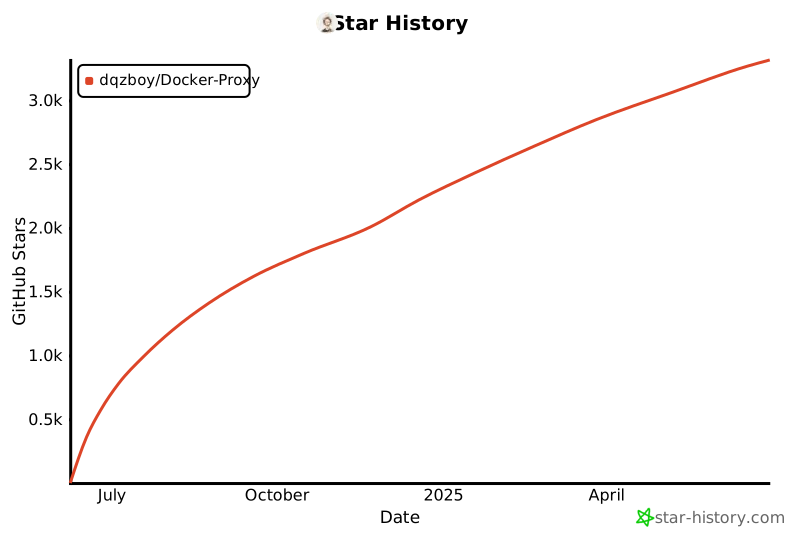](https://star-history.com/#dqzboy/Docker-Proxy&Date)
|